Hotel PMS: run your property from one cloud system
Short answer: A hotel PMS (Property Management System) is the central software a hotel runs on: reservations, room availability, check-in and check-out, guest folios, cash handling and reporting all live in one place. uMehmon is a cloud hotel PMS built for Uzbekistan and Central Asia, combining a live tape chart, automatic E-mehmon guest registration, a multi-currency cashier, branded invoices and USALI-based analytics in the browser, with nothing to install.
If you are still running reservations from a paper ledger, a spreadsheet or a messaging group, this page explains what a PMS actually does, which problems it solves and how to get started with uMehmon.
What is a hotel PMS and why do you need one?
A PMS is the operational core of a hotel. When a front desk agent greets a guest, finds the booking, assigns a room and takes payment, all of it happens inside the PMS. The general manager uses the same system to see occupancy, revenue and costs without assembling reports by hand.
Without a PMS, information is scattered. Bookings sit in one notebook, payments in another, guest registration on a separate government website, and OTA reservations in an email inbox. The result is familiar to every hotelier: double bookings, missing payments and late guest registrations.
Core modules of a property management system
A modern hotel PMS usually includes:
- Reservations and tape chart — a visual grid of which room is booked on which dates.
- Front office — check-in, check-out, room moves and stay extensions.
- Housekeeping — room cleaning statuses.
- Cashier and folio — payments, the guest bill and invoices.
- Reporting and analytics — occupancy, ADR, RevPAR and other KPIs.
- Integrations — government systems (E-mehmon in Uzbekistan) and online travel agencies (OTAs).
Why local requirements matter
Most international PMS products are designed around European or North American workflows. Hotels in Uzbekistan have additional needs: registering every guest in E-mehmon, accepting payments in UZS and foreign currencies (USD, EUR, RUB), processing local Uzcard and Humo cards, issuing invoices that carry a tax ID (STIR) and bank details, and giving staff an interface in Uzbek or Russian. uMehmon was built around exactly these requirements, which makes it a practical choice for independent hotels, hostels and serviced apartments in the region.
What uMehmon Hotel PMS can do
Everything listed below is available in the product today.
Tape chart (room rack)
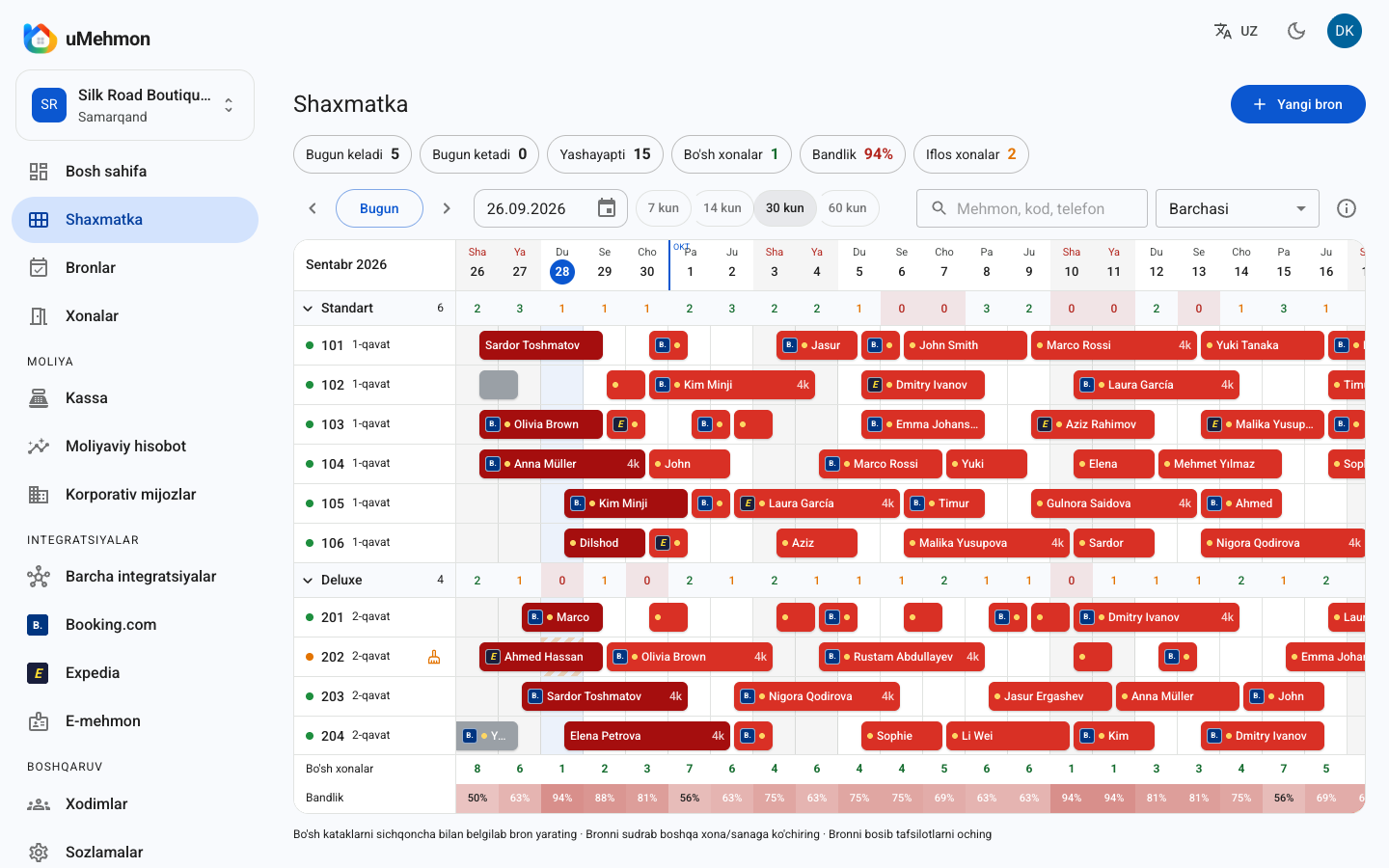
The tape chart is the heart of the PMS. uMehmon shows every room on one screen in 7, 14, 30 or 60-day views. Occupied nights are shown in red, and you can drag a booking to another room or date. To create a new reservation, simply select empty cells.
There is also an "unassigned bookings" row. If no free room is available for a booking, it lands in that row and the system raises an overbooking warning. The chart updates live, so when several staff members work at once everyone sees changes instantly. A daily summary at the top shows occupied and vacant rooms, arrivals, departures and the occupancy percentage.
Reservation management
- Nightly and hourly (day-use) bookings; hourly stays of 8 hours or more automatically switch to the nightly rate.
- Rate ranges (min–max): staff can price within the range, and anything outside it requires manager approval.
- Corporate discounts and prepayments.
- Walk-ins with instant check-in.
- Group bookings: several rooms under one name, with bulk check-in, check-out or cancellation.
- Room moves (with a recorded reason), extensions and paid late check-out.
- No-shows, cancellations and reinstatement, plus early departures that release the remaining nights automatically.
- Same-day resale: once a departing guest's room is cleaned, it can be sold again that day.
Housekeeping
Every room has a status: clean, dirty or inspected. At check-out the room turns "dirty" automatically. A dirty room cannot be assigned for today until it has been cleaned. Rooms under maintenance can be blocked so they never go on sale.
E-mehmon integration
Guest registration is one of the most time-consuming front desk tasks in Uzbekistan. In uMehmon you enter passport details (with lookup by passport number from the Ministry of Internal Affairs database), and pressing check-in sends the registration to E-mehmon automatically. For foreign guests, visa and border checkpoint details are captured as well.
At check-out the system asks whether to deregister the guest from E-mehmon too. If E-mehmon is unavailable or returns an error, the request goes into an automatic retry queue. You can also enter a registration number manually. Every action is recorded in the E-mehmon log.
Cashier, folios and invoices
The cashier accepts cash in UZS and foreign currencies (USD, EUR, RUB), cards (Uzcard, Humo, Visa, Mastercard), terminal payments, bank transfers and online payments. Central Bank exchange rates update with one click. Expenses are tracked by category, and cash collections and deposits are recorded separately.
A key principle: cash transactions cannot be deleted, only voided with a reason. You always see in real time how much is in the drawer and how much was paid by card.
The folio is the guest's bill: services, payments and balance. Invoices are generated on your letterhead with logo, company details, tax ID, bank details, the amount in words and sequential numbering such as INV-2026-00001. You can print them or send them as PDF.
Corporate accounts
Each company profile stores a discount percentage and a billing arrangement: "company pays" or "guest pays". Company receivables are tracked separately. Learn more on the hotel CRM page.
Financial analytics
uMehmon calculates around 24 metrics based on USALI (the Uniform System of Accounts for the Lodging Industry): room revenue, cash receipts, expenses, GOP and GOP margin, occupancy, ADR, RevPAR, GOPPAR, ALOS, lead time, cancellation rate, direct versus OTA share and more. Every metric is compared with the previous period. See hotel analytics for details.
Channel manager
On Pro and Business plans, two-way iCal sync with Booking.com is live today, and the Booking.com Connectivity API is available with a certified account. Expedia currently connects via iCal. Incoming bookings are placed into a free room automatically, show up in red on the tape chart and trigger a notification on every screen. Your availability is pushed back to the OTA to prevent double bookings. Agoda, Airbnb, Trip.com and other channels are on the roadmap. More on the channel manager page.
Team, roles and audit trail
Roles include Superadmin, Director, Manager, Finance (cashier) and Front Desk. Every action is written to an activity log showing who changed what and when, with old and new values. The log cannot be edited or deleted and can be exported to CSV. Each booking also keeps its complete history.
Quick Q&A about hotel PMS
Q: Is a PMS the same as a channel manager? A: No. A PMS runs your internal operations, while a channel manager syncs availability and bookings with OTAs. uMehmon includes both in one system.
Q: What happens if the internet goes down? A: A cloud PMS needs an internet connection, so a backup connection such as mobile data is recommended. Your data is stored on the server, so nothing is lost if a front desk computer fails.
Q: Can I manage several properties from one account? A: Yes. One account can hold multiple properties, and each property's data is kept separate.
Q: Does it work on a phone? A: Yes, through the mobile browser on phones and tablets. A native mobile app is not available yet and is on the roadmap.
Comparison: paper, spreadsheets and a hotel PMS
| Criterion | Paper ledger | Excel / Google Sheets | uMehmon Hotel PMS |
|---|---|---|---|
| Availability overview | Flip through pages | Grid, updated by hand | Live tape chart, 7–60 days |
| Overbooking control | None | None (partial with formulas) | Unassigned row plus warning |
| E-mehmon registration | Separate, manual | Separate, manual | Automatic at check-in |
| Cash control | Manual counting | Manual, rows easy to delete | Void only with reason, live balance |
| Booking.com sync | None | None | Two-way iCal (Pro/Business) |
| Reporting | Manual at month end | Hand-built formulas | ~24 USALI metrics automatically |
| Multiple users | One book | Version conflicts | Roles and live updates |
| Audit trail | None | Limited | Immutable activity log |
Paper and spreadsheets are cheap to start with, but mistakes become more expensive as a property grows. A single double-sold room can mean an unhappy guest, a refund and damage to your OTA review score.
Pros and limitations
Pros
- Cloud-based: no installation, no server, no in-house IT required.
- Built for Uzbekistan: E-mehmon, UZS and foreign currencies, Uzcard and Humo, invoices with tax ID.
- PMS, channel manager, cashier and analytics in one product.
- Immutable audit log and void-only cash corrections for strong internal control.
- Hostel mode with per-bed selling.
- Multiple properties under one account.
- 14-day free trial with every feature unlocked.
Limitations (honestly)
- No English interface yet; the app is currently in Uzbek and Russian.
- No booking engine (direct booking widget for your website) yet; it is in development.
- No online payments via Payme or Click and no fiscal cash register (OFD) integration yet.
- No native App Store or Google Play app; use the mobile browser.
- Agoda, Airbnb and Trip.com connections are still on the roadmap.
- No automated dynamic pricing or AI features yet.
- The Start plan does not include the channel manager.
Numbers and formulas: what a PMS measures
A PMS earns its keep by calculating the right numbers automatically. Here are the core formulas with illustrative examples:
| Metric | Formula | Example (illustrative) |
|---|---|---|
| Occupancy | Room nights sold ÷ room nights available × 100% | 20 rooms, 14 sold → 70% |
| ADR | Room revenue ÷ room nights sold | 7,000,000 UZS ÷ 14 = 500,000 UZS |
| RevPAR | Room revenue ÷ room nights available, or ADR × occupancy | 500,000 × 0.70 = 350,000 UZS |
| ALOS | Room nights sold ÷ number of bookings | 60 nights ÷ 20 bookings = 3 nights |
| GOP margin | GOP ÷ total revenue × 100% | 40M ÷ 100M = 40% |
| Cancellation rate | Cancelled bookings ÷ total bookings × 100% | 6 ÷ 60 = 10% |
Example: a 30-room hotel sells 630 room nights in a 30-day month. Available room nights = 30 × 30 = 900. Occupancy = 630 ÷ 900 = 70%. If room revenue is 315,000,000 UZS, ADR is 500,000 UZS and RevPAR is 350,000 UZS.
In a spreadsheet you rebuild these numbers by hand each month; a PMS keeps them current every day. For a deeper dive, read how to calculate RevPAR.
Estimate your own time savings
Actual savings depend on your property, so run the numbers yourself.
Example: if registering one guest in E-mehmon manually takes 5 minutes and you have 15 check-ins a day, that is 75 minutes a day, or roughly 37 hours a month. Automatic submission removes most of that work; staff only need to verify the passport details.
uMehmon pricing
| Plan | Price per month | Rooms | Staff users | Channel manager |
|---|---|---|---|---|
| Trial | Free for 14 days | Up to 30 | All features | Included |
| Start | 290,000 UZS | Up to 10 | 2 | Not included |
| Pro | 590,000 UZS | Up to 40 | 10 | Included |
| Business | 990,000 UZS | Up to 300 | 50 | Included |
Example: on the Pro plan, a 40-room hotel pays 590,000 ÷ 40 = 14,750 UZS per room per month; a 20-room property pays 29,500 UZS per room. Compare that with the cost of a single overbooking or one lost payment.
How to choose a hotel PMS
Ask every vendor these questions:
- Does the system support local requirements such as E-mehmon, UZS and local cards?
- Is the interface available in the language your staff actually use?
- Is it cloud-based, or does it need an on-premise server?
- Is a channel manager built in or sold separately?
- Can cash transactions be deleted? (The right answer is no.)
- Is there a tamper-proof audit trail?
- Is there a free trial that unlocks every feature?
For a broader comparison of approaches, read best hotel PMS. For an overview of the category, see hotel management software.
A day at a hotel running uMehmon
Morning. The manager opens the tape chart and sees today's arrivals, departures and occupancy. Bookings that came in overnight from Booking.com are already assigned to free rooms and highlighted in red.
Midday. Guests check out and their rooms flip to "dirty" automatically. Once cleaned, a room returns to "clean" and can be resold the same day. When a walk-in guest arrives, the front desk checks them in within minutes and the registration goes to E-mehmon automatically.
Evening. The cashier sees how much cash is in the drawer and how much was paid by card, then records the cash collection. The owner checks the day's revenue and occupancy from a phone.
Month end. Financial analytics compares GOP, ADR and RevPAR with the previous month and shows outstanding company balances. No spreadsheet required.
Who uMehmon is for
- Hotels (boutique, city and business) — full functionality.
- Hostels — hostel mode with per-bed selling. See hostel management software.
- Aparthotels — apartments and studios managed as rooms. See aparthotel PMS.
- Guest houses and B&Bs — the Start plan covers up to 10 rooms.
- Small chains — several properties in one account.
Common mistakes when switching to a PMS
Moving to a PMS changes habits, not just software. Avoid these pitfalls:
- Running two systems in parallel for too long. When the notebook and the PMS coexist for months, nobody knows which one is right. Set a cut-over date within one or two weeks.
- Leaving future bookings behind. Every upcoming reservation must be in the tape chart before cut-over, or you risk overbooking.
- Giving everyone the same permissions. Front desk staff do not need financial reports or settings; assign roles by responsibility.
- Going live on channels immediately. Test the Booking.com connection in simulation mode first and make sure room types are mapped correctly.
- Ignoring housekeeping statuses. If housekeepers do not mark rooms clean, the system will not let you assign them. Explain this to the team on day one.
The 14-day trial is usually enough to train the team, move bookings over and test your channels.
Conclusion
A hotel PMS is not an optional extra; it is the foundation every other process relies on. It prevents overbookings, automates E-mehmon registration, makes cash handling transparent and gives owners reliable numbers. uMehmon delivers all of this in the cloud, tailored to the realities of running a hotel in Uzbekistan.
Start a 14-day free trial — sign up, add your rooms and create your first booking on the tape chart today.
How to set up uMehmon Hotel PMS
- 1
Sign up
Create an account at umehmon.uz/register. Your 14-day free trial starts immediately.
- 2
Add your property and rooms
Enter your hotel details, create room types and rooms, and set your rates.
- 3
Invite your team
Add your director, manager, cashier and front desk staff by email or invite link and assign roles.
- 4
Move existing bookings
Enter upcoming reservations from your notebook or spreadsheet into the tape chart by selecting empty cells.
- 5
Configure E-mehmon and the cashier
Connect the E-mehmon integration, set up payment methods and currencies, and pull the latest Central Bank exchange rates.
- 6
Connect your channels
On Pro or Business, connect Booking.com and Expedia via iCal and verify everything in test mode first.
Frequently asked questions
A hotel PMS (Property Management System) is the core operational software of a hotel. It manages reservations, room availability, check-in and check-out, guest folios, the cashier and reports in one place.
No. uMehmon is cloud-based and runs in a web browser on a computer, tablet or phone. You do not need a server or special hardware.
E-mehmon is Uzbekistan's mandatory online guest registration system. uMehmon registers the guest in E-mehmon automatically at check-in, offers to deregister at check-out, retries failed requests automatically and keeps a full E-mehmon log.
Yes. Even with 5 to 10 rooms you need to avoid lost bookings, register guests on time and keep cash under control. uMehmon's Start plan is designed for properties with up to 10 rooms.
Yes, the Pro and Business plans include a channel manager. Two-way iCal sync with Booking.com works today, and the Connectivity API is available with a certified account. Expedia currently connects via iCal.
Start is 290,000 UZS per month (10 rooms, 2 staff), Pro is 590,000 UZS (40 rooms, 10 staff, channel manager) and Business is 990,000 UZS (300 rooms, 50 staff). The first 14 days are free with all features.
Not yet. The interface is currently available in Uzbek and Russian, which are the working languages of most hotel teams in Uzbekistan. An English interface is on the roadmap.
Yes. Hostel mode supports multiple beds per room, a separate booking and separate E-mehmon registration for each guest, pricing per bed per night, and occupancy calculated by beds.
Try uMehmon free for 14 days
Tape chart, reservations, cash desk, E-mehmon and Booking.com — in one platform. No credit card required.
Start free trial