
Hostel management software built around beds, not rooms
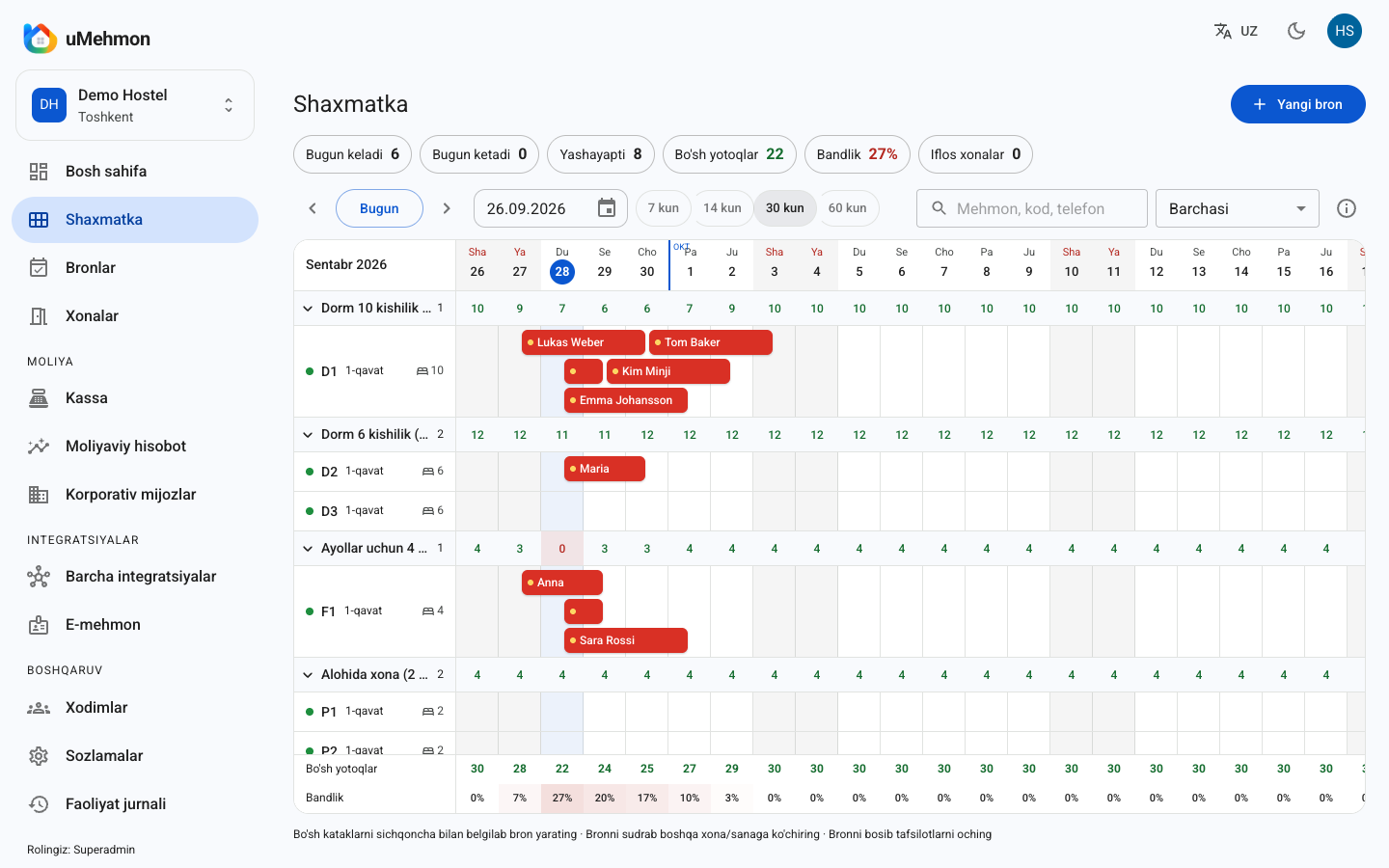
Short answer: hostel management software is a system that treats the bed, not the room, as the unit you sell, and tracks every guest on their own. In uMehmon's hostel mode each room holds several beds, rates are set per bed per night, every guest gets a separate booking and a separate E-mehmon registration, and occupancy is measured in beds. It runs in the browser and you can start a 14-day free trial.
Why doesn't regular hotel software work for a hostel?
In a traditional hotel the room is the product. One booking takes one room, and the guests in it arrive and leave together. A hostel breaks that model: an eight-bed dorm can hold eight strangers at once, each with their own arrival and departure dates.
Hostel owners who try to run a dorm in hotel software usually end up with one of two workarounds. The first is to create every bed as a separate "room". The tape chart balloons to 40 or 60 rows, it becomes hard to tell which bed sits in which room, and reports show the wrong number of rooms. The second is to create the room as a whole and note guests in the comments field. Then occupancy, revenue and guest registration turn into manual bookkeeping.
That is why a hostel needs software where the bed is the base unit. This is about correctness, not convenience: rates, occupancy, legal registration and cash all add up only when the system understands how a hostel actually works.
Common pain points for hostels without a system
- Searching a notebook or spreadsheet to find out who is in which bed
- A bed that was vacated but never put back on sale
- Two guests assigned to the same bed — internal overbooking
- Registering every foreign guest by hand on the E-mehmon website
- Confusing end-of-shift reconciliation of som, dollars and card payments
- An owner who cannot see what is going on when they are off-site
How uMehmon's hostel mode works
uMehmon is a cloud hotel PMS built for hotels, hostels, apart-hotels and guest houses in Uzbekistan. Hostel mode is not a separate product; it is a way of running the same platform with hostel logic. The account Superadmin turns it on in Settings.
Beds inside rooms
Each room gets a bed count: "Dorm A" with 8 beds, "Dorm B (female)" with 6, "Private double" with 2. The system treats each bed as its own sellable unit, so the front desk can see at a glance how many beds are free in any room.
One guest, one booking
In hostel mode one booking equals one guest. If five friends turn up together, the system holds five bookings. That can sound like extra work, but in practice it saves time: when one friend leaves a day early and another extends, their folios, payments and registrations never get tangled.
Per-bed-per-night pricing
The rate is set per bed per night. Nightly stays are calculated the usual way: however many nights a guest stays, that many bed-nights are charged. Price ranges (minimum to maximum) are supported: the front desk can adjust the rate within the range, while a rate outside it needs a manager's approval. Corporate discounts and prepayments are available as well.
Tape chart with many guests per room row
The tape chart is the hostel's control panel. In uMehmon every room appears on one screen in 7, 14, 30 or 60-day views. In hostel mode a single room row shows several guests at once, so you can see immediately which nights a dorm is full and which nights still have open beds.
The chart updates live: if two receptionists and a manager work at the same time, a booking entered by one appears on the others' screens instantly. Daily stats — occupied, free, arriving, departing and occupancy percentage — sit on the same screen. For more on the metric itself, read what is hotel occupancy.
E-mehmon: one registration per guest
Guest registration in the E-mehmon system is mandatory in Uzbekistan. For a hostel it is one of the most time-consuming tasks, because guests are many and turn over quickly. In uMehmon:
- passport details are entered once, with lookup by passport number from the Ministry of Internal Affairs database;
- the registration is sent to E-mehmon automatically at check-in;
- visa and border-crossing point details are captured for foreign guests;
- failed requests go into an automatic retry queue;
- at check-out the system asks whether to deregister the guest from E-mehmon too;
- a registration number can be entered manually, and every action is kept in the E-mehmon log.
In hostel mode E-mehmon is the one integration that stays active — and it is the one every hostel in Uzbekistan legally needs.
Cash desk: som, foreign currency and cards
Many hostel guests are international travellers, so payments arrive in a mix of currencies and methods. The uMehmon cash desk accepts Uzbek som and foreign cash (USD, EUR, RUB), Uzcard, Humo, Visa and Mastercard cards, terminals and bank transfers. Central Bank exchange rates load with one click, and the split between cash and card balances is visible in real time.
A cash transaction cannot be deleted — only voided with a reason. That removes a lot of "where did the money go?" conversations at shift change. Expenses are logged by category, and cash collections and deposits are tracked separately.
Housekeeping and room status
Rooms are marked clean, dirty or inspected. When a guest checks out, the room turns dirty automatically and cannot be used for a same-day check-in until it has been cleaned. Rooms under maintenance are flagged separately. In a hostel this matters: even if only one guest leaves a dorm, housekeeping can see which room needs attention.
Team roles and audit log
Hostels are often run by a small crew: the owner, a couple of receptionists and volunteers. uMehmon has Superadmin, Director, Manager, Finance (cashier) and Front Desk roles. Staff can be added with an email and password or through an invite link.
The activity log records every action: who, when and what changed (old value → new value). Entries cannot be edited or deleted, and the log exports to CSV. The owner can check what is happening from a phone, wherever they are.
Key hostel metrics and formulas
In a hostel every metric is calculated from beds.
| Metric | Hostel formula | What it tells you |
|---|---|---|
| Bed occupancy | Bed-nights sold ÷ Bed-nights available × 100% | Share of beds you actually sold |
| ADR per bed | Bed revenue ÷ Bed-nights sold | Average price of one bed-night |
| Revenue per available bed | Bed revenue ÷ Bed-nights available | The hostel equivalent of RevPAR |
| ALOS | Bed-nights sold ÷ Number of guests | Average length of stay |
| Cancellation rate | Cancelled bookings ÷ All bookings × 100% | How many bookings you lose |
uMehmon's financial analytics include around 24 USALI-based metrics — Occupancy, ADR, RevPAR, GOP, ALOS, lead time, cancellation rate and more — with previous-period comparison and daily charts. See hotel analytics for details, and what is ADR and how to calculate RevPAR for a deeper look at the formulas.
The numbers: a worked example
The figures below are illustrative only, not data from a real hostel.
Example: a hostel has 5 rooms with 8 beds each — 40 beds in total. In a 30-day month there are 40 × 30 = 1,200 available bed-nights. 840 are sold.
- Bed occupancy = 840 ÷ 1,200 × 100% = 70%
- With 105,000,000 som in bed revenue, ADR = 105,000,000 ÷ 840 = 125,000 som
- Revenue per available bed = 105,000,000 ÷ 1,200 = 87,500 som
Example: on a given night all five rooms have at least one guest, but only 22 beds are occupied. Counted by rooms, occupancy looks like 100%. Counted by beds, it is 22 ÷ 40 = 55%. That gap is exactly why hostel software has to measure occupancy in beds.
Comparison: notebook/spreadsheet vs hotel software vs uMehmon hostel mode
| Criterion | Notebook or spreadsheet | Regular hotel software | uMehmon hostel mode |
|---|---|---|---|
| Unit of sale | Handwritten | Room | Bed within a room |
| Pricing | Calculated by hand | Per room per night | Per bed per night, with price range |
| Guests with different dates in one room | Confusing | Hard or impossible | Each guest is a separate booking |
| Occupancy | Manual | By room (wrong for hostels) | By bed |
| E-mehmon | Manual, on a separate website | Depends on the product | Automatic, per guest |
| Cash and currency | Separate notebook | Depends on the product | Som, USD, EUR, RUB, cards, voids |
| Several staff at once | No | Depends on the product | Live tape chart |
| Audit trail | No | Depends on the product | Tamper-proof log, CSV export |
| OTA channels | Manual | Depends on the product | Off in hostel mode (Hostelworld on roadmap) |
The strength of uMehmon's hostel mode is the in-house operation: beds, bookings, E-mehmon and cash. Online distribution is where the current limits are, and we cover those honestly below.
Pros and cons
Pros
- The bed is the base unit. Rates, occupancy and bookings follow hostel logic, with no "every bed is a room" hacks.
- Guests are independent. Different dates, extensions, early departures and payments never get mixed up.
- Automatic E-mehmon. Registration is sent at check-in, and failures go into a retry queue.
- Mixed payments under control. Currencies and cards in one cash desk, and transactions cannot be deleted.
- Cloud-based. Nothing to install, works on phones and tablets.
- Oversight. Roles and a tamper-proof activity log give owners confidence even from a distance.
Cons and limitations
- OTA channels are off in hostel mode. Booking.com and Expedia sync works in hotel mode; in hostel mode only E-mehmon is active, so online bookings are entered manually.
- No Hostelworld integration yet — it is on the roadmap.
- No booking engine for your own website yet — it is in development.
- No online payments (Payme/Click) or fiscal register (OFD) integration yet.
- No App Store or Google Play app — though the system works fully in a mobile browser.
- No English interface yet — Uzbek and Russian only, which matters if your team does not read either.
- One booking per guest means large groups take a little longer to enter.
Q&A
Q: my hostel has male and female dorms. How do I keep them apart? A: create each one as its own room and say so in the name, for example "Dorm 6 — female". They will appear on separate rows of the tape chart.
Q: we also have private rooms. Can they live in the same system? A: yes. Create the private room with its bed count, for example two. Because pricing is per bed per night, set the rate accordingly if you sell the room as a whole.
Q: a guest left early. Does their bed go back on sale? A: yes. On early check-out the remaining nights are released and reappear as available on the tape chart.
Q: a volunteer covers the night shift. Can they change rates or delete payments? A: that depends on their role. A rate outside the price range needs manager approval, cash transactions cannot be deleted, and every action is in the log.
Q: can I run two hostels from one account? A: yes. One account can hold several properties, and each property's data is kept separate.
Pricing for hostels
| Plan | Price per month | Rooms | Staff | Notes |
|---|---|---|---|---|
| Trial | Free for 14 days | Up to 30 | — | All features |
| Start | 290,000 som | Up to 10 | 2 | No channel manager |
| Pro | 590,000 som | Up to 40 | 10 | Channel manager (off in hostel mode) |
| Business | 990,000 som | Up to 300 | 50 | For large properties and groups |
Because OTA channels do not run in hostel mode, choose a plan by room count and team size. A small hostel is often fine on Start; if you run several shifts, Pro is more comfortable.
A typical day in uMehmon
- In the morning the receptionist opens the tape chart and sees today's arrivals and departures.
- Departing guests are checked out: the folio is closed, any balance is collected, and the system offers to deregister them from E-mehmon.
- The vacated room turns dirty automatically; once cleaned, staff mark it clean.
- A new guest's passport details are entered, a bed is chosen, and check-in sends the registration to E-mehmon.
- During the day walk-ins are checked in on the spot, stays are extended, or a paid late check-out is added.
- In the evening the cashier reconciles the drawer: som, foreign cash and cards are shown separately, and collections are recorded.
- The owner checks the day's occupancy and revenue from a phone.
Running serviced apartments rather than dorms? See apart-hotel PMS. New to the concept? Start with what is a hostel PMS.
Who it's for
- City hostels with 2 to 40 rooms in Tashkent, Samarkand, Bukhara, Khiva and other tourist hubs
- Hostels selling a mix of dorm beds and private rooms
- Properties with many international guests where E-mehmon paperwork eats up the day
- Owners who aren't on site every day and want to keep an eye on things remotely
If Booking.com is your main sales channel and automatic OTA sync is a must, hotel mode with the channel manager may suit you better for now — talk it through with us before you decide.
Conclusion
A hostel is a business of beds, and it needs software that understands beds. uMehmon's hostel mode tracks every bed, every guest and every E-mehmon registration separately, measures occupancy in beds and keeps a multi-currency cash desk in order. It has limits — OTA channels are off in hostel mode and Hostelworld is still on the roadmap — but for moving day-to-day operations out of the notebook and into a proper system, it is ready today.
Start a 14-day free trial: sign up, switch on hostel mode and add your first dorm to the tape chart today.
How to set up hostel mode in uMehmon
- 1
Sign up
Create an account at umehmon.uz/register and start the 14-day free trial.
- 2
Enable hostel mode
Log in as the Superadmin, open Settings and switch on hostel mode.
- 3
Add rooms and beds
Create each dorm and private room and set how many beds it has.
- 4
Set per-bed rates
Enter the per-bed-per-night rate for each room type and, if needed, a minimum and maximum price range.
- 5
Invite your team
Add front desk, manager and cashier accounts with the right roles, or send them an invite link.
- 6
Test E-mehmon
Configure the E-mehmon integration and check in a test guest to confirm the registration goes through.
- 7
Move existing bookings
Enter upcoming bookings on the tape chart, one per guest, and start running the hostel in the system.
Frequently asked questions
In hostel mode it sells beds. Each room is given a number of beds, the rate is set per bed per night, and every guest is a separate booking. That lets you run a dorm where guests arrive and leave on different dates without mixing up their stays.
The account Superadmin switches hostel mode on in Settings. After that you set the number of beds for each room, enter per-bed-per-night rates, and the tape chart starts showing several guests in a single room row.
Yes. Because each hostel guest is a separate booking, each one also gets a separate E-mehmon registration. The registration is sent automatically at check-in, and if it fails the request goes into an automatic retry queue.
No. In the current version, E-mehmon is the only active integration in hostel mode and OTA channels are switched off. A Hostelworld integration is on the roadmap but not available yet, so online bookings have to be entered manually.
In hostel mode occupancy is calculated by beds, not rooms. For example, if 30 of 40 beds are sold for a night, occupancy is 75 percent, even if every room has at least one guest in it.
Not yet. The interface is currently in Uzbek and Russian, which covers most front-desk teams in Uzbekistan. An English interface is on the roadmap.
Yes. The cash desk accepts Uzbek som, USD, EUR and RUB in cash, Uzcard, Humo, Visa and Mastercard cards, card terminals and bank transfers. Central Bank of Uzbekistan exchange rates are loaded with one click.
It depends on the number of rooms and staff. Start covers up to 10 rooms and 2 staff, Pro up to 40 rooms and 10 staff, and Business up to 300 rooms and 50 staff. Since OTA channels are off in hostel mode, rooms and team size are the main factors.
Try uMehmon free for 14 days
Tape chart, reservations, cash desk, E-mehmon and Booking.com — in one platform. No credit card required.
Start free trial