Hotel management software that brings bookings, cash and compliance into one screen
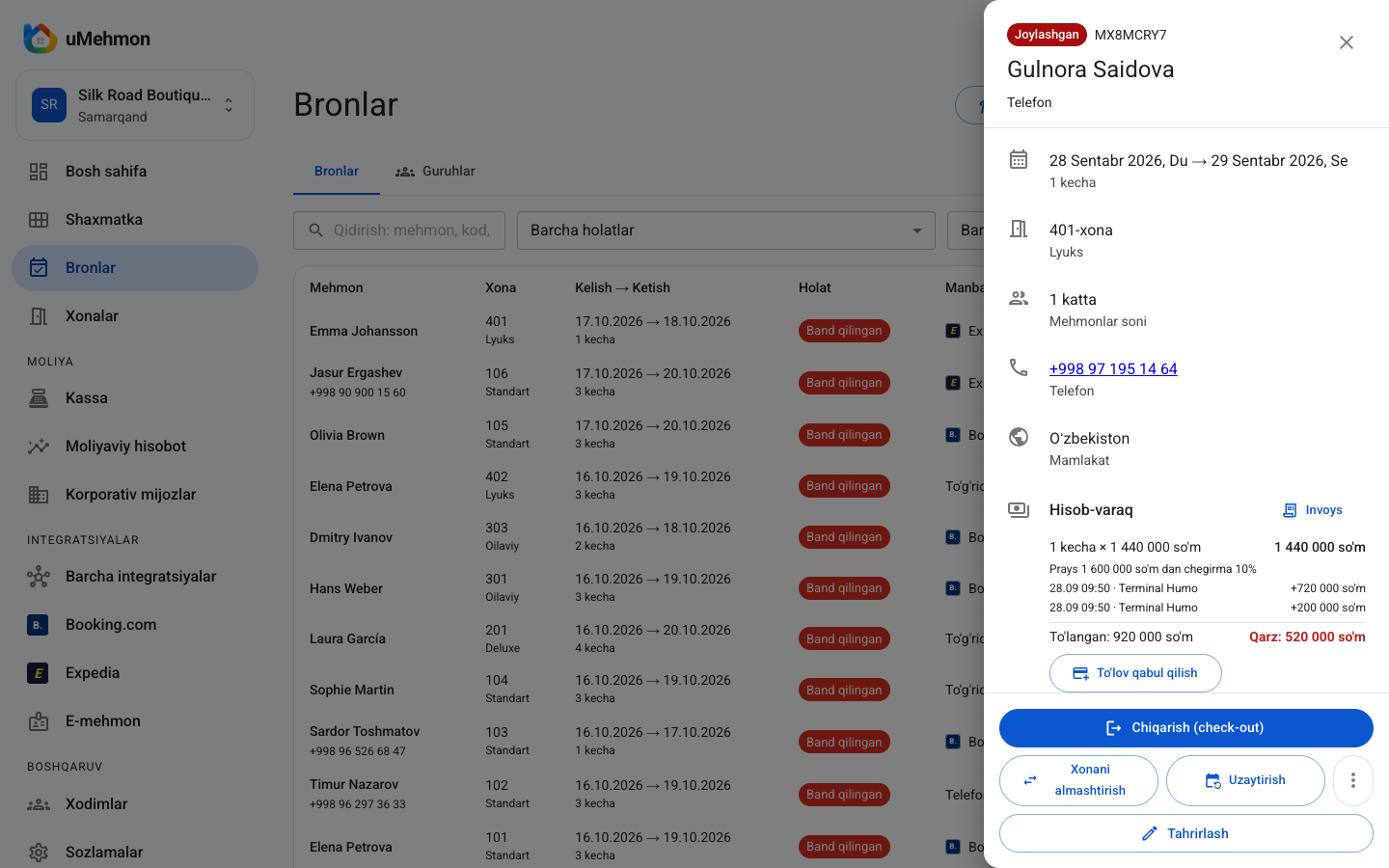
Short answer: Hotel management software automates reservations, room availability, check-in and check-out, payments and reporting, replacing notebooks, spreadsheets and scattered websites with a single screen. uMehmon is cloud hotel management software for hotels, hostels, aparthotels and guest houses in Uzbekistan and Central Asia, combining a tape chart, E-mehmon guest registration, a multi-currency cashier, Booking.com sync and financial analytics in one place.
This page explains the main types of hotel software, how to choose one, what implementation looks like and which everyday problems uMehmon solves today.
What kind of software does a hotel actually need?
"Hotel software" means different things to different people. Some mean a booking diary, others a cash register, others a Booking.com connection. In practice, a modern property needs one system that covers all of these jobs at once.
Core jobs of hotel management software
- Reservation system — bookings from phone calls, messaging apps, Booking.com and walk-ins in one place.
- Room availability — see at a glance which room is free and when.
- Check-in and check-out — including mandatory guest registration (E-mehmon in Uzbekistan).
- Money — cashier, guest folio, invoices and expenses.
- Reporting — occupancy, revenue and average rate.
- Control — who did what in the system.
Software that does all of this is usually called a hotel PMS (Property Management System). For a deeper look, see the hotel PMS page.
Installed versus cloud software
Hotel software falls into two broad categories.
Installed (desktop) software runs on the front desk computer, with data stored on that machine or a local server. If the computer fails or gets infected, data can be lost, and backups are your problem. Checking on the hotel from home or another city is difficult.
Cloud software runs in a web browser. Data is stored on a secure server, updates arrive automatically, and the owner can check the property from a phone anywhere. uMehmon is cloud software.
uMehmon: what each team member gets
Software only earns its place if it makes everyone's daily work easier. Here are uMehmon's real features by role.
| Role | Daily task | Tool in uMehmon |
|---|---|---|
| Front desk | Create bookings, check guests in | Tape chart, select-to-book, walk-ins |
| Front desk | Register guests | Automatic E-mehmon submission at check-in, passport lookup |
| Cashier (Finance) | Take payments | UZS, USD, EUR, RUB, Uzcard, Humo, Visa, Mastercard |
| Cashier (Finance) | Close the day | Live cash and card balance, cash collection records |
| Manager | Control rates and bookings | Rate ranges with approval, group bookings |
| Manager | Prepare rooms | Clean / dirty / inspected statuses |
| Director | Review results | ~24 USALI metrics compared with the previous period |
| Superadmin | Oversight and security | Roles, immutable activity log, CSV export |
For the front desk
The front desk lives on the tape chart. Every room is on one screen in 7, 14, 30 or 60-day views. Select empty cells to create a booking; drag a booking to move it to another room or date. Hourly (day-use) bookings are supported, and stays of 8 hours or more automatically switch to the nightly rate.
At arrival, staff enter passport details, and pressing check-in sends the registration to E-mehmon automatically. For foreign guests, visa and border checkpoint details are captured too. If something fails, the request goes into a retry queue, so nobody has to resubmit it by hand again and again.
For the cashier
The cashier accepts cash in UZS, US dollars, euros and roubles, plus Uzcard, Humo, Visa, Mastercard, terminal payments and bank transfers. Central Bank exchange rates update with one click. No transaction can be deleted, only voided with a reason, so if the drawer is short at the end of the day, finding out why is straightforward.
For the manager
The manager sets a rate range: staff can price between the minimum and maximum, and anything outside needs manager approval. Group bookings, such as wedding guests or a corporate team, are managed under one name and can be checked in or out together. Housekeeping statuses make sure no guest is placed in an uncleaned room.
For the director and owner
The director sees occupancy, today's revenue and the cash position from a phone without visiting the property. Financial analytics compares GOP, ADR, RevPAR, OTA versus direct share, cancellation rate and more against the previous period. The activity log records every change: who, when and what.
Everyday problems hotel software solves
These are the situations hotels running on paper or spreadsheets hit most often, and how uMehmon handles them.
"We sold the same room twice"
This usually happens when a Booking.com reservation is not copied into the notebook in time. With uMehmon (Pro and Business plans), bookings from Booking.com and Expedia arrive via iCal straight onto the tape chart and are placed into a free room automatically. If no room is free, the booking lands in the "unassigned bookings" row with an overbooking warning. Your own availability is pushed back to the OTA. See the channel manager page for details.
"We forgot to register a guest in E-mehmon"
With manual registration, a tired or busy agent can miss a guest. In uMehmon, registration is part of check-in: the request is sent automatically, queued for retry if it fails and visible in the E-mehmon log.
"The cash drawer is short and nobody knows why"
Deleting a spreadsheet row is easy. In uMehmon, cash transactions cannot be deleted, only voided with a reason, and every action is logged with the user and time. This protects honest staff too: the log answers every question.
"A guest was put into a dirty room"
After check-out a room turns "dirty" automatically and cannot be assigned for today until housekeeping marks it clean.
"We build company invoices by hand in Word"
Invoices are generated automatically on your letterhead with logo, company details, tax ID, bank details, the amount in words and sequential numbering such as INV-2026-00001. Each company profile stores its discount and billing arrangement ("company pays" or "guest pays"), and outstanding balances show up in receivables. More on the hotel CRM page.
"The guest wants another night but the room is taken"
Extensions, room moves (with a reason) and paid late check-out are separate actions. Drag the booking to another room on the tape chart and the history is preserved. If a guest leaves early, the remaining nights are released and go back on sale.
"Month-end reporting takes two days"
uMehmon's financial analytics has the key metrics ready, with daily charts, revenue sources and corporate balances.
Data security
Hotel software stores passport details and financial records, so security matters. In uMehmon each property's data is isolated, keys are encrypted and access is controlled through sessions and roles. Five roles (Superadmin, Director, Manager, Finance and Front Desk) let you give each person permissions that match their job. When someone leaves, simply remove them; password resets and invite links are built in.
Quick Q&A: choosing hotel software
Q: Isn't a free tool or a spreadsheet template enough? A: For a very small property at the start, perhaps. But a spreadsheet cannot connect to E-mehmon, cannot sync with Booking.com and cannot stop cash records from being deleted.
Q: Can I run several properties in one system? A: Yes. One uMehmon account can hold several properties, each with separate data.
Q: Will the software add a booking widget to my website? A: Not yet. The booking engine is in development; see the booking engine page.
Q: Will we lose data if an employee leaves? A: No. Data lives in the cloud, you simply deactivate the user, and all of their actions remain in the log.
Comparison: which type of software fits?
| Criterion | Spreadsheet / notebook | Installed desktop software | International cloud PMS | uMehmon |
|---|---|---|---|---|
| Installation | None | On a PC | None | None (browser) |
| Access from anywhere | No | Usually no | Yes | Yes, phone and tablet |
| E-mehmon integration | No | Depends on vendor | Usually no | Yes, automatic |
| UZS, Uzcard, Humo | Manual | Depends on vendor | Often limited | Yes |
| Uzbek-language interface | — | Rare | Usually no | Yes (plus Russian) |
| Channel manager | No | Rare | Often an add-on | Built into Pro and Business |
| Backups | Your job | Your job | Vendor | Vendor (cloud) |
| Updates | — | Manual | Automatic | Automatic |
International cloud PMS products can be very capable, but they usually do not cover local requirements such as E-mehmon, local cards or the Uzbek language. Installed software misses the benefits of the cloud. If your team works primarily in English and you operate outside Uzbekistan, weigh the fact that uMehmon's interface is currently in Uzbek and Russian only.
Pros and limitations
Pros of uMehmon
- Built for Uzbekistan: E-mehmon, UZS and foreign currencies, Uzcard and Humo, invoices with tax ID.
- Uzbek and Russian interface with dark mode.
- Cloud-based: no installation, servers or backups to manage.
- PMS, cashier, channel manager and analytics in one product.
- Hostel mode with per-bed selling and a separate E-mehmon registration for every guest.
- Immutable audit log for internal control.
- 14-day free trial with every feature unlocked.
Current limitations
- No English interface yet.
- No website booking widget (booking engine) yet.
- No Payme or Click online payments and no OFD fiscal integration yet.
- No native mobile app; use the mobile browser.
- Agoda, Airbnb, Trip.com and Hostelworld are on the roadmap; Booking.com and Expedia (iCal) work today.
- No automated dynamic pricing or AI features yet.
- An internet connection is required; a backup connection is recommended.
Numbers: how to judge the value of hotel software
Judge software by numbers, not gut feeling. These formulas and illustrative examples help.
| What to calculate | Formula | Example (illustrative) |
|---|---|---|
| Cost per room per month | Plan price ÷ number of rooms | Pro: 590,000 ÷ 25 = 19,600 UZS |
| Front desk time on E-mehmon | Minutes per guest × daily check-ins × 30 | 5 × 10 × 30 = 1,500 min = 25 hours |
| Cost of one overbooking | Refund + cost of relocating the guest | 500,000 + 300,000 = 800,000 UZS |
| Occupancy | Room nights sold ÷ room nights available × 100% | 450 ÷ 750 = 60% |
| ADR | Room revenue ÷ room nights sold | 180M ÷ 450 = 400,000 UZS |
Example: a 25-room hotel on the Pro plan pays 590,000 UZS per month. If the software prevents just one overbooking a month (800,000 UZS in the illustrative example above), it has paid for itself. Rerun these numbers with your own property's real figures.
For more on occupancy, read what is hotel occupancy.
Implementation stages
| Stage | What happens | Owner |
|---|---|---|
| 1. Preparation | Room list, rates, staff list | Director |
| 2. Setup | Account, room types, rate ranges | Manager |
| 3. Training | Tape chart, check-in, cashier actions | Manager and front desk |
| 4. Migration | Enter and verify future bookings | Front desk |
| 5. Integrations | E-mehmon, Booking.com/Expedia (iCal) | Manager |
| 6. Cut-over | Notebook closed, everyone works in the software | Whole team |
A useful tip: use test (simulation) mode before connecting live channels. It lets you see safely how Booking.com reservations land on the tape chart.
Choosing by property type
City hotel with 15–40 rooms. The Pro plan usually fits: up to 40 rooms, 10 staff and the channel manager. Booking.com and Expedia reservations arrive on the tape chart automatically.
Small guest house with up to 10 rooms. The Start plan is enough: tape chart, E-mehmon and cashier. If you later need the channel manager, upgrade to Pro.
Hostel. Hostel mode supports several beds per room, with a separate booking and E-mehmon registration for each guest. See hostel management software.
Larger hotel or small chain. The Business plan covers up to 300 rooms and 50 staff, with several properties in one account.
For the bigger picture, see the hotel management system page, and read about hotel automation on our blog.
8 questions to ask before you buy
- Does the software handle E-mehmon automatically, or will you still register guests by hand?
- Which currencies and card types does the cashier accept?
- Is the interface in the language your staff actually use?
- How does it connect to Booking.com, and does that cost extra?
- Can a cash record be deleted?
- Is there a log showing who did what?
- Does it work on a phone?
- Is there a free trial with every feature unlocked?
uMehmon answers each of these openly; see the pros and limitations above.
Conclusion
The right hotel management software saves staff time, reduces mistakes and gives owners reliable numbers. In Uzbekistan it must, above all, handle E-mehmon, local payments and the languages your team speaks. uMehmon is a cloud system built around exactly those requirements and fits hotels, hostels, aparthotels and guest houses.
In short, good hotel software should:
- show every booking (phone, walk-in, Booking.com, Expedia) on one tape chart;
- register guests in E-mehmon automatically at check-in;
- run the cashier transparently in UZS and foreign currencies without allowing deletions;
- give owners occupancy, ADR, RevPAR and GOP without spreadsheets;
- grant permissions by role and log every action.
Start a 14-day free trial — sign up and test the software with your own rooms today.
How to switch to hotel management software
- 1
Map your current processes
Write down how bookings, payments and E-mehmon registration are handled today and who is responsible for each.
- 2
Start the free trial
Create an account at umehmon.uz/register and enter your room types, rooms and rates.
- 3
Assign roles
Add front desk, cashier, manager and director accounts and give each person only the permissions they need.
- 4
Move future bookings
Enter every upcoming booking from your notebook or spreadsheet into the tape chart and check it against the original.
- 5
Connect integrations
Set up E-mehmon and, on the Pro plan, connect Booking.com and Expedia via iCal.
- 6
Set a cut-over date
From that day on, every new booking and payment is recorded only in the software and the notebook is archived.
Frequently asked questions
Hotel management software handles reservations, room availability, check-in and check-out, payments and reporting. uMehmon also registers guests in Uzbekistan's E-mehmon system and syncs bookings with Booking.com.
Installed software lives on one computer, and backups and updates are your responsibility. Cloud software runs in a browser, stores data on a server, updates automatically and can be accessed from any device.
It depends on the team, but the core tasks of creating a booking, checking a guest in and taking payment all happen on the tape chart and are usually learned within a few days. The 14-day free trial is designed for exactly this.
The interface is currently available in Uzbek and Russian. An English interface is not available yet and is on the roadmap.
Yes. Even a small property must register guests in E-mehmon on time and keep bookings and payments in order. The Start plan covers up to 10 rooms and 2 staff for 290,000 UZS per month.
Yes. Upcoming bookings can be entered quickly on the tape chart by selecting empty cells. We recommend entering every future booking before your cut-over date.
The cashier records online payment as a payment method, but there is no direct Payme or Click integration yet; it is in development. There is also no fiscal cash register (OFD) integration yet.
Yes. uMehmon works in the browser on phones and tablets and includes a dark mode. There is no separate App Store or Google Play app yet.
Try uMehmon free for 14 days
Tape chart, reservations, cash desk, E-mehmon and Booking.com — in one platform. No credit card required.
Start free trial